



Crypto Payment Gateway for Website: Integration Guide
Accept crypto payments on your website with a clear, practical setup. This guide explains how a crypto payment gateway for website works, how to integrate it step by step, and which providers fit different business models. Learn how to avoid common mistakes, manage fees, and build a reliable checkout flow. If you need a custom solution, Scrile can help design and implement a scalable crypto payment system tailored to your product.

accept bitcoin payments on your website
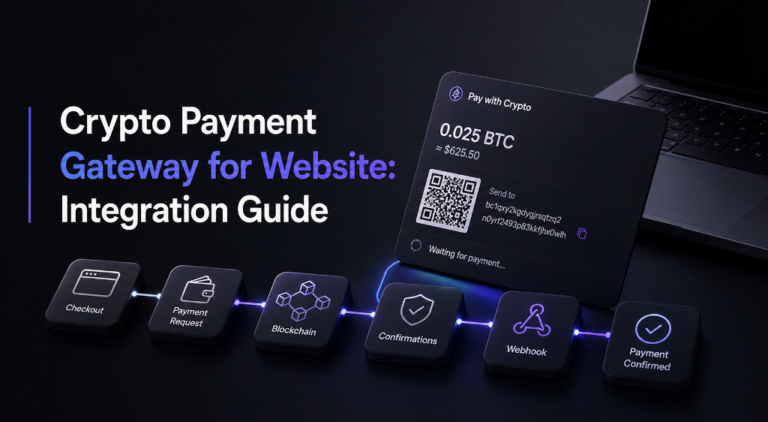
A crypto payment gateway for website manages the full payment flow, from generating a unique address to confirming transactions and updating your system automatically. You can connect it using hosted checkout for a fast launch or API integration for deeper control. If you just need to start, hosted works. If payments are part of your product, go with API or a custom setup.
A crypto payment gateway for website is a service that lets you accept cryptocurrency payments through a structured checkout instead of handling wallets manually. It generates payment requests, monitors blockchain confirmations, and updates your system when funds arrive.
You can connect it in two main ways. A hosted checkout is the fastest route, where the provider handles most of the flow. API integration gives full control but requires development work.
For small businesses or quick launches, hosted solutions work well. If you’re building a scalable product or platform, a custom or API-based setup makes more sense.
What Happens Behind a Crypto Payment
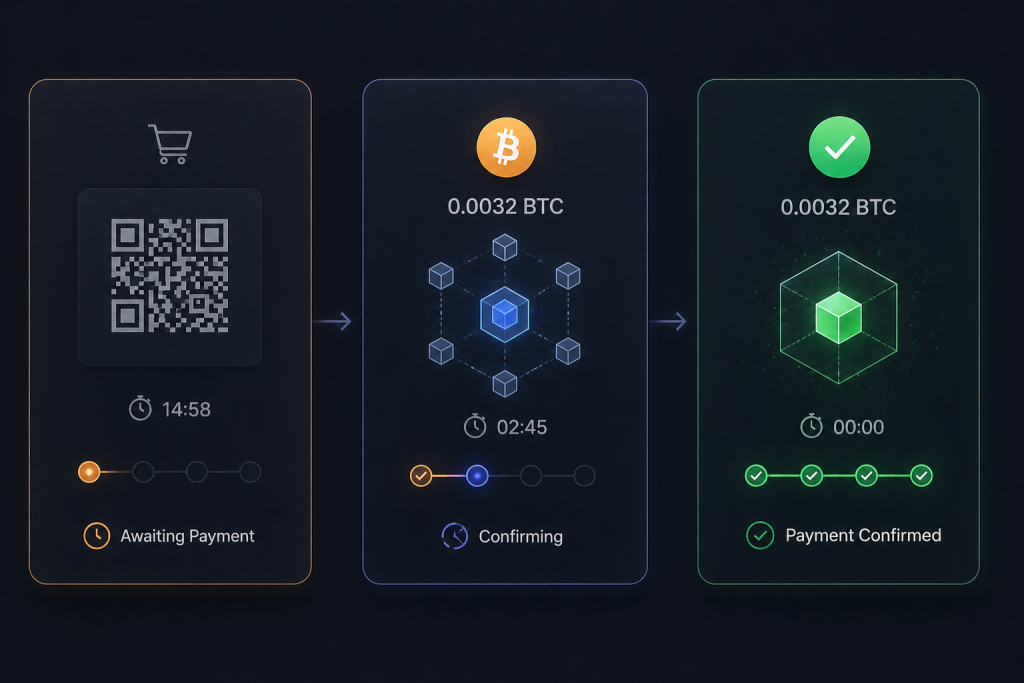
When someone pays with crypto, it’s not just “money sent, done.” There’s a sequence your system has to track correctly, otherwise you either miss payments or confirm them too early. That’s exactly why a crypto payment gateway for website exists.
Here’s the real flow, without abstraction:
- user clicks “pay with crypto”
- your system requests a payment session from the gateway
- gateway generates a unique wallet address (or invoice)
- user sends funds
- transaction appears in the blockchain (pending)
- network adds confirmations (usually 1–6 depending on coin)
- gateway detects confirmations
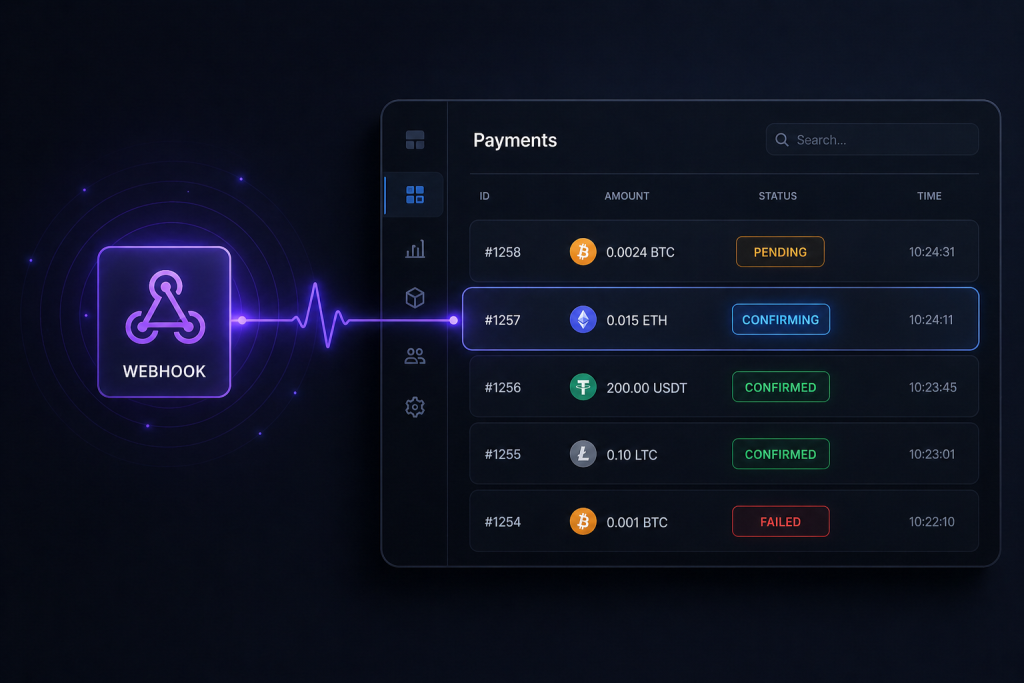
- gateway sends a webhook to your backend
- your system marks the order as paid
At this stage, confirmations are what actually make the payment reliable, not the transaction itself.
“Transactions don’t start out as irreversible. Instead, they get a confirmation score that indicates how hard it is to reverse them.”
The critical part here is confirmation tracking + webhook, not the payment itself. That’s where most DIY setups fail.
Why using just a wallet breaks quickly

At first, sending funds to a wallet looks like enough. In practice, it turns messy fast:
- Volatility
The amount sent may not match the order value by the time it confirms - Reconciliation chaos
No automatic way to match payments to orders - User friction
Customers deal with addresses, fees, and timing manually - Accounting headaches
Every payment comes in a different asset and price point
That’s why most businesses move away from raw wallets and toward structured cryptocurrency payments through a gateway.
Ways to Accept Crypto on a Website
There are a few ways to plug crypto into a checkout, and they don’t all behave the same. Some feel quick at first and turn painful later. Others take more setup but save you from constant manual work.
Manual wallet setup (what people usually try first)
This is the most obvious way to accept crypto on website. You drop a wallet address or a QR code on the page, the customer sends funds, and that’s it. No integration, no API, no backend logic.
It works… until it doesn’t. Someone sends slightly less because of network fees. Another user copies the wrong address. You refresh a block explorer trying to match transactions with orders. At low volume, it’s manageable. At scale, it becomes chaos. There’s no clean link between payment and purchase, and every mistake lands on you.
Crypto gateway (where things start making sense)
A gateway changes the experience completely. Instead of sending money into a shared wallet, each payment is tied to a specific request. The system knows what was paid, when, and for which order.
The customer still pays with crypto, but the flow feels closer to a normal checkout. Behind the scenes, the gateway handles confirmations, tracks status, and can even convert funds if needed. That’s how businesses reliably accept Bitcoin payments on your website without manually verifying every transaction.
Hybrid setups (when you want control without rebuilding everything)
Some teams don’t want to fully rely on a third party. They use a gateway to detect and confirm payments, but keep custody or settlement logic on their side.
This gives more flexibility. You can route funds differently, manage wallets yourself, or plug payments into a larger system. It also adds responsibility. Once you step into this territory, you’re no longer just integrating, you’re designing your own payment flow.
Step-by-Step Integration Guide

This is where most people either get it working… or quietly give up halfway through. The idea is simple, but once you start wiring it into a real product, details pile up fast. If you’re asking how do I accept crypto payments on my website, this is the real path, not the “connect and done” version you see in landing pages.
Step 1 — Choose a gateway provider
At this point, you’re not picking a brand, you’re picking constraints. Some gateways look cheap until you realize they don’t support the coins your audience uses. Others have beautiful dashboards but painful APIs.
Think about how your product will behave. If you expect users paying in Bitcoin, Ethereum, and maybe a few stablecoins, coverage matters. If you’re building something dynamic, like subscriptions or marketplaces, API flexibility matters more than fees.
And yes, fees still matter. A difference between 0.5% and 1.5% doesn’t look dramatic until you process real volume.
Step 2 — Create account and verify
You sign up, confirm your email, and then hit the usual friction. If fiat conversion is involved, verification kicks in. Documents, business details, sometimes even payout checks.
This part feels annoying, but it defines how money moves later. Do you want to receive crypto and hold it? Or settle into fiat automatically? That decision changes how your accounting and risk behave from day one.
Step 3 — Generate API keys
Now you’re inside the dashboard, staring at something called “API credentials.” This is where integration actually begins.
You’ll get two modes:
- sandbox, where nothing is real
- live, where mistakes cost money
Mix them once, and you’ll understand why everyone warns about it.
Keys themselves are simple. One identifies your app. The other proves it’s really you. What matters is where you use them. Frontend exposure vs backend security is not optional knowledge here.
Step 4 — Build the checkout flow
This is the first moment where your product starts to feel real.
You can take the shortcut and redirect users to a hosted page. It works. It’s fast. It also feels slightly disconnected from your interface.
Or you go deeper. You create a payment request from your backend, pass the order amount, currency, maybe metadata. The gateway responds with a payment session. Now you control how it looks, where it sits, how it behaves.
That’s usually where people understand what how to integrate crypto payments on website actually means. It’s not a button. It’s a flow.
A small detail that saves hours later: always store the payment ID the gateway returns. That’s your anchor for everything — status checks, refunds, debugging.
Step 5 — Handle callbacks
Nothing breaks more often than this part.
When a payment changes state, the gateway sends a request to your server. Not a suggestion — a signal. Your system needs to catch it, verify it, and react correctly.
The trap is thinking “payment detected” equals “payment complete.” It doesn’t. Especially with Bitcoin, confirmations matter. Too early, and you risk accepting unconfirmed transactions. Too late, and users think something is broken.
Another thing people miss: webhooks repeat. Sometimes twice, sometimes more. If your system isn’t idempotent, you’ll confirm the same order multiple times. It’s a quiet bug that shows up weeks later.
Step 6 — Test before launch
This is where theory meets reality, and reality usually wins.
Run through the full flow. Not once, but a few times. Send small payments. Try underpaying. Try cancelling halfway. Watch how long confirmations actually take instead of what docs promise.
If something feels slightly off during testing, it will become a real issue under load. That last round of checks is what separates a working integration from one that creates daily support tickets.
Popular Crypto Payment Gateways Compared
Once you move past “can I accept crypto,” the next question hits fast: which provider actually fits your setup? They all promise the same thing on the surface, but the differences show up in fees, supported coins, and how much control you get over the flow. Choosing blindly here usually leads to re-integration later, which is exactly what you want to avoid when building a crypto payment gateway for website setup.
Some gateways are designed for quick launches. Others are built for handling volume, compliance, or custom logic. The table below cuts through the noise and shows how they differ in practice.
| Provider | Fees | Coins Supported | Fiat Conversion | Best For | Notes |
| Coinbase Commerce | ~1% | BTC, ETH, USDC | No (crypto only) | simple setups | clean API, fast onboarding |
| NOWPayments | 0.5–1% | 300+ | Optional | altcoin-heavy stores | wide coin support, flexible |
| BitPay | ~1% | major coins | Yes | compliance-focused | fiat settlement, stable |
| CoinGate | ~1% | 70+ | Yes | EU merchants | strong plugin ecosystem |
| BVNK | custom | stablecoins | Yes | enterprise | API-first, built for scale |
What stands out is how differently they approach risk and flexibility. Some keep everything in crypto, which is simpler but exposes you to volatility. Others convert instantly, which stabilizes revenue but adds another layer of fees and compliance.
If you’re experimenting or launching quickly, simpler tools do the job. If you’re building a product where payments are core, the decision becomes architectural. That’s where details like API behavior, webhook reliability, and settlement options matter more than the headline fee.
Fees, Margins, and Real Numbers
Fees look small until you run them through real volume. That’s where cryptocurrency payments start to feel either efficient or surprisingly expensive depending on how you set things up.
Take a simple case. You process 1,000 orders per month, average order value is $50. That’s $50,000 in revenue.
With a typical crypto gateway fee around 1%:
→ you’re paying about $500 per month
Now compare that to standard card processing. At 2.9% + $0.30 per transaction, the math shifts quickly:
→ percentage fees alone: ~$1,450
→ fixed fees (1,000 × $0.30): $300
→ total: ~$1,750+
That’s roughly $1,200–$1,300 difference every month.
Sounds great on paper, but there are trade-offs. Crypto isn’t fixed-value money. If you accept Bitcoin or Ethereum directly, price can move between the moment a user pays and when you convert or withdraw. Some gateways solve this with instant conversion, but then you’re paying additional spread or settlement fees.
So the real margin depends on your setup. Hold crypto, and you take volatility. Convert instantly, and you reduce risk but give up part of the savings.
How to Choose the Right Gateway for Your Business

At some point, you stop thinking “how do I connect this” and start thinking “what actually makes sense for my setup.” A crypto payment gateway for website can be anything from a simple redirect page to a fully custom payment system. The difference shows up later, not during setup.
If you’re just starting
If you’re launching something small, don’t overthink it. A hosted checkout is usually enough. You plug it in, users get redirected, they pay, you get notified. Done.
It’s not beautiful. It’s not deeply integrated. But it works, and that’s the point. Most teams just want to accept crypto payments on website without spending weeks building infrastructure they might not even need yet.
If you’re scaling
This is where the cracks start to show. Redirecting users away from your product feels clunky. You want the payment to happen inside your flow, not outside it.
So you switch to API-based integration. Now you control the payment session, the UI, the logic behind it. Orders, users, payments — everything starts to connect properly. It’s more work, but it removes friction you didn’t even notice at the beginning.
If you need control
Some setups don’t fit neatly into one provider. Fees change, availability varies, and sometimes one gateway just doesn’t behave the way you need.
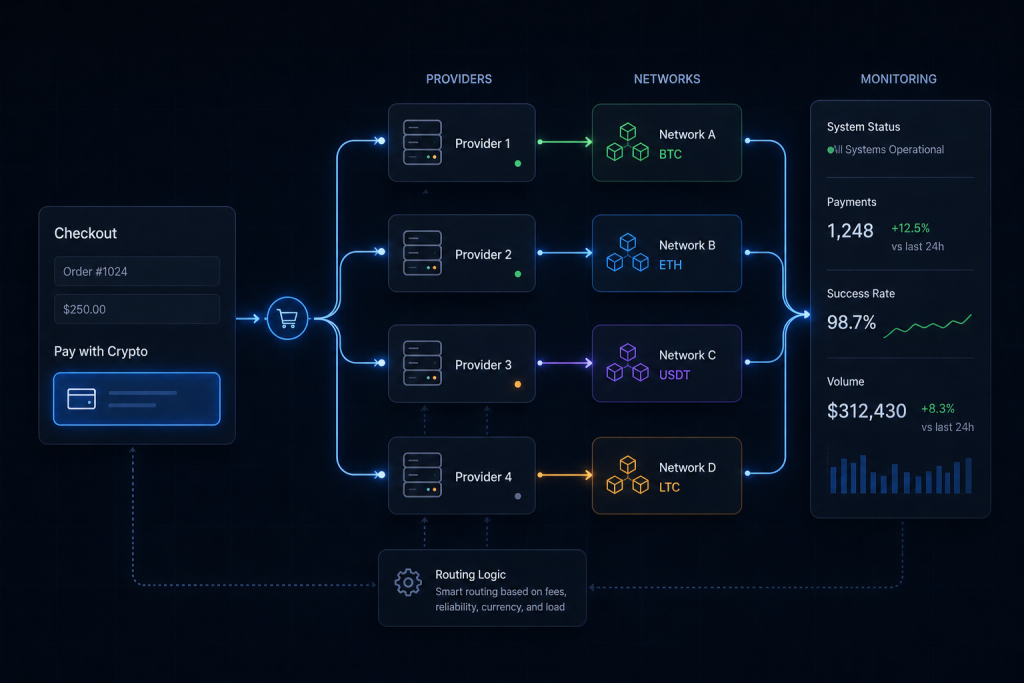
That’s when people start combining things. One provider for certain coins, another for different regions, maybe custom routing on top. It’s not something you build on day one, but once volume grows, control starts to matter more than simplicity.
Common Mistakes
Even with a solid setup, a crypto payment gateway for website can fail in quiet, expensive ways. Most issues aren’t technical complexity. They come from skipping small but critical details.
- Ignoring confirmations
Treating a detected transaction as final. Without confirmations, you risk accepting payments that never fully settle. - Not handling failed or partial payments
Users send less than required or abandon midway. If your system doesn’t catch this, orders stay in limbo. - No webhook validation
Accepting every callback blindly. Without signature checks, your backend becomes vulnerable to fake payment events. - Relying on a single provider
If it goes down or delays confirmations, your checkout stops working. - Poor UX around crypto checkout
Confusing instructions, unclear amounts, or timing issues push users away before they complete payment.
Building a Custom Crypto Payment Flow That Actually Fits Your Business

At some point, plugins and ready-made tools stop being enough. A crypto payment gateway for website becomes part of your core product, not just a checkout add-on. That’s where custom development starts to make sense.
Scrile doesn’t offer a boxed solution. It’s a development service that builds payment logic around your business model. Instead of adapting your product to a gateway, the gateway is shaped around how your platform actually works.
This approach is especially useful when payments are not just “pay and leave,” but part of a larger system. Think subscriptions, tipping, or multi-user platforms where money moves between different roles.
What you get with a custom setup:
- payment flows designed around your UX, not forced redirects
- support for multiple providers instead of relying on one
- flexible routing for different currencies and regions
- backend logic for subscriptions, recurring payments, or payouts
- cleaner integration with your product’s core features
If you’re building something that needs to scale, a custom crypto payment gateway for website setup gives you control that off-the-shelf tools simply can’t match.
What Approach Actually Fits Your Situation
| Situation | Best Approach | Why |
| small shop or MVP | hosted gateway | gets you live in hours, minimal setup, good for testing demand |
| SaaS or digital platform | API integration | lets you connect payments to users, plans, and internal logic |
| high transaction volume | custom payment logic | gives control over fees, confirmations, and processing flow |
| global audience | multi-provider setup | avoids downtime, improves coverage across regions and coins |
| subscription-based product | custom + API hybrid | supports recurring billing and flexible payment handling |
| marketplace or multi-user system | fully custom architecture | enables payouts, splits, and complex money flows |
Conclusion
A crypto payment gateway for website isn’t about trends or headlines. It’s just a payment tool, like any other. The difference is how you implement it. A rushed setup leads to failed transactions, confused users, and lost revenue. A well-built flow feels natural, almost invisible, and that’s what drives conversion.
If crypto payments are becoming part of your business, it’s worth doing them properly from the start. Scrile can help you design and build a system that fits your product instead of forcing it into a template.
If you’re serious about scaling, reach out to Scrile and build a crypto payment gateway for website that actually works under real conditions.
FAQ
How to take crypto payments on a website?
You can take crypto payments through a wallet or a gateway. A wallet works for direct transfers, but it requires manual tracking. A gateway automates checkout, confirmations, and settlement.
Can you integrate a payment gateway with a website?
Yes. Integration can be done through hosted checkout or API. A crypto payment gateway for website works best with API integration if you need automation and control.
How to create a crypto payment gateway?
It requires planning, blockchain selection, security setup, API development, UI design, webhook handling, and testing. A crypto payment gateway for website is a full system, not just a feature.
How much does a crypto payment gateway cost?
Fees usually range from 0.5% to 1%, with additional costs for conversion, withdrawals, and development depending on complexity.
Is accepting crypto payments secure?
Yes, if implemented correctly. Security depends on proper webhook validation, confirmation handling, and API protection.
Which coins should a website accept?
Most businesses start with Bitcoin, Ethereum, and stablecoins. Additional coins depend on audience demand and operational complexity.
How do taxes and accounting work with crypto payments?
Payments are recorded at fiat value at the time of transaction. Businesses must track transaction data and conversion rates for reporting.
Can crypto payments be converted to fiat automatically?
Yes. Many gateways support automatic conversion to fiat or stablecoins, reducing exposure to price volatility.

